Debugging a 62 KB RAM Overflow in an STM32 OV7670 Camera System
Introduction
So I have been writing a camera driver for my amateur cubesat project for like two months now. I know, two months is a long time to write a driver. But given the long hours at work, I get a few minutes of useful cognitive bank at the end of the day, so it takes time to actually lock in after a long day.
Further, most of the material am working for is new to me. So I have to take time to do deep and thorough research to just understand what I am working on. This means reading other people’s code, reading papers, revising embedded architectures etc. I actually designed my payload firmware around an interesting pattern called the Hardware Proxy Pattern that I will write about very soon.
Anyway, enough with the excuses. Now that I have written a bunch of code to capture snaps from this OV7670 camera, I went ahead to build the code. To my surprise, on the STM32Cube IDE console I was hit with the following error:
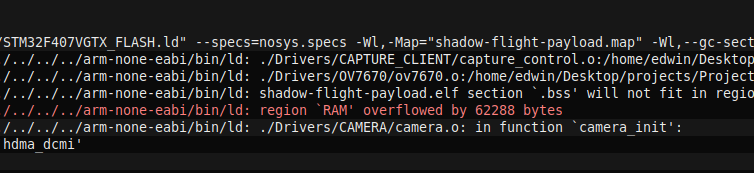
Clearly, am out of memory. Rather my variables cannot fit into the available RAM space. This was dissapointing but at the same time an interesting bug, because now I have to fix it. Let’s chase the dopamine hit of fixing bugs.
Understanding the bug
The first thing I do to understanding this bug is to literally read it(obviously). RAM overflowed by 62288 bytes. Okay. First this means that we are out of RAM memory. Looking closely at the line above it, it says that .bss will not fit in region….
But why will it not fit? And what the heck is .bss? I already knew what the .bss is, but I will explain it here just for the curious minds:
Program sections in most embedded applications are divided into the following parts:
| section | use |
|---|---|
| .text | stores executable program instructions |
| .rodata | stores read only data e.g const variables |
| .data | stores initialized global and static variables |
| .bss | stores uninitialized (or zero-initialized) global and static variables |
These sections can be stored in different memories depending on their use. For instance, .text is stored in the flash memory(it is the program anyway). .bss and .data are stored in RAM. You can read more about memory segmentation from this article Memory Segmentation in embedded
Source of OverFlow
Now that I know that my .bss section is overflowing, I have a clue of what might be causing it. Since the .bss section stores uninitialised static or global variables, there must be a very large uninitialized variable somewhere in my code. This variable is so large that it is in excess of 62KB.
Now the next logical question to ask is this, what is the available RAM that my STM32f407VGT6 has such that I can afford this overflow. I can get this from the datasheet as shown here:
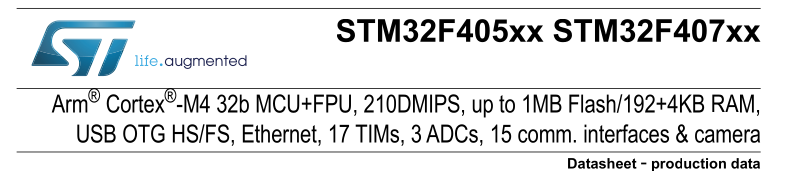
This chip has 192 KB RAM available. Understand that this is shared RAM. It is meant to hold everything from all initialized variables(.data), uninitialized variables(.bss), stack for main(), FreeRTOS task stacks, RTOS objects, DMA buffers etc. So it means that in addition to the already existing variables, the RAM still overflowed by 62KB.
My camera frame settings
Initially for my images I had planned to capture a QVGA image. QVGA represents the resolution of the image (Quarter VGA). A full VGA frame is 640x480 pixels(307200 pixels). A quarter VGA is 25% of that, with a resolution of (320 x 240)(76800 pixels).
I had configured my camera to capture pixels in the RGB-565 format(more on this in another article). In this format, each pixel requires 16 bits(2 bytes) to store an image. So a full QVGA frame alone will require a total of:
1
320 x 240 x 2 = 153600 bytes ~ 150KB
150KB just to store a raw RGB565 frame. Phewks!
In the code, my frame was initialized like this:
1
2
3
4
5
#define QVGA_WIDTH 			(320)
#define QVGA_HEIGHT 		(240)

extern uint16_t frame_buffer[QVGA_WIDTH * QVGA_HEIGHT];
That frame buffer is huge. Now, remember that all uninitialized variables are stored in th e.bss section. That means that this 150KB need to fit in the .bss section. Considering that there are other uninitialized global and static variables in the firmware, if the summation of this 150KB and other variables was more than 192KB, then it means that foe me to get a 62KB memory overflow, the total RAM I required was:
’’’ 192 + 62 (KB) = 254 (KB) ‘’’
Correction and Tradeoff
There were two solutions to this kind of bug that I could come up with. One, use an STM32 IC that has a larger SRAM avaiable. The hindrance to this is that I have already designed my PCBs and produced them, so this iteration is not going to be possible. The second solution is taking a hit on my image resolution. Since I am using QVGA, if I reduce this resolution to QQVGA(25%), I can save around 75% of SRAM. Here’s how:
1
2
3
4
5
QQVGA = 160x120
Total Pixels = 19200
Using RGB565, Each pixel is 2 bytes
Total bytes occupied = 19200 x 2 = 38400 Bytes = 37.5KB
Clearly, I have cut the memory usage by 75%, but that is a huge hit on the image resolution, which am willing to take. So I updated this piece of code and recompiled my code, and everything was just satisified with the amount of memory footprint I got.
1
2
3
4

#define QQVGA_WIDTH 					(160) // QQVGA
#define QQVGA_HEIGHT 					(120)
Next Steps
Thinking ahead, one thing I would improve on this system design is to obviously use an STM32 board with larger RAM footprint. However, I think there is a point of diminishing returns when it comes to balancing the image resolution, RAM and cost. Simply because memory is one of the most expensive resources in computing. So my thinking is I need to get just enough RAM to capture a QVGA image resolution, while keeping the cost of the system as low as possible.
Or I can just use an external RAM chip, but now that introduces increased complexity in terms of high speed routing, memory caching and access etc, issues who’s ROIs are not as great anyway.
Moving ahead, I will just capture a grayscale QQVGA snapshot and see how that goes.
I will ofcourse write about my findings in another article. Meanwhile, keep building.