Understanding Pixel Formats(Grayscale, RGB565, RGB888)
Introduction
Hi.
I wrote this short article just to pass a little image acquisition knowledge I have been using for my cubesat camera payload system. This is not one of those comprehensive articles but its enough to understand a significant part of the payload system, epecially the firmware.
In order to represent color, we need color information. There are basically 3 primary colors we need to represent any and every other color. We need red, green and blue. For instance each pixel in a color camera has a Bayer filter whose sole job is to add color data to the captured image data. The Bayer filter is a clever arrangement of red, green and blue colors, such that when the light is captured, we are able to tell what the composition of the image is in terms of red, blue, and green.
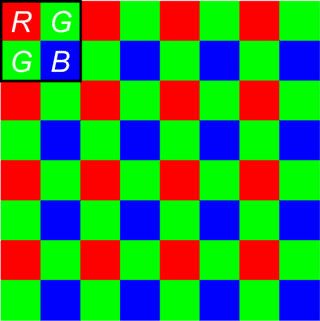 bayer filter
Now the question is how do we store these colours. For digital systems, this begs the question, how many bits and in what format do we store this data. I am going to explain the most popular formats below, namely RGB565 and RGB888.
Grayscale
But before we talk about color, what of images that do not have color? These are basically known as grayscale images or rather binary images. Grayscale images have only black and white, with shades of gray in-between. In these images, each pixel represents a shade of gray, ranging from black to white. For an 8bit pixel, white is represented by 255, and black is represented by 0;
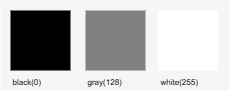
In a grayscale image, each pixel is represented by a single unsigned 8-bit integer (uint8_t). Numerically this means that a graycale image represents up to 256 shades of gray. For example, for a small grayscale image, the representation could look like this:
1
2
3
4
5
6
uint8_t image = {
	{0, 64,128 },
	{64,128, 193 },
	{128, 192, 255}
} // each number represents the brightness of one p
Color images
Grayscale images are basic and simple to understand and use. Plus they occupy very little memory footprint simply because they are 8 bit images.
For color images, we now have 3 channels, red, green, blue. The intensity of these channels determines how the images look like, in terms of color content.
Color Depth
To understand color images, we need to understand what color depth is. Color depth is the number of bits used to represent the color or intensity of a single pixel in an image. This value determines how many distinct colors or shades each pixel can represent. So basically how many bits for red, for green and for blue. The number of possible values is determined by the number of bits.
1
2
Values = 2^n
// where n is the color depth
Color depth is normally denoted as bits per pixel(bpp). The more the bits, the more colors we can describe. The most common bpp value is 24, which you can represent 16777216 colors with.
Color formats
Color formats then go ahead to describe how these bits are arranged. The most common are RGB888, RGB565, RGBx2222.
1. RGB888
In this format, we represent red, green and blue bits using 8 bits each. This is 24bit value.
Lets say we have a value like this:
1
RGB(100, 20, 55);
This can be represented as follows:
1
uint32_t rgb888 = (100 << 16) | (20 << 8) | (55 << 0);
Here, the MSB represents the brightest color bits, and gets lighter as you go down to the LSBs.

RGB888 bit arrangement
2. RGB565
RGB565 uses 5 bits for red, 6 for green, and 5 bits for blue. The use of 6 bits for green is because our eyes can perceive colors around the green spectrum better than red or blue.
In this format, you notice that we are losing 8 bits of color information in total. So we can say it is a kind of compressed color format.
Supposing you have a three values of red, green and blue, you can easily convert RGB888 to RGB565 using bit manipulation as follows:
1
2
3
4
5
6
7
8
9
10
11
12
13
14
15
16
// single RGB888 color information
uint8_t r;
uint8_t g;
uint8_t b;

// masks for each color
uint8_t r_mask = 0b11111000;
uint8_t g_mask = 0b11111100;
uint8_t b_mask = 0b11111000;

// converted result
uint16_t rgb_565;

rgb565 = ( (uint16_t) (r & r_mask) << 8) ) |
				 ( (uint16_t) (g & g_mask) << 3) ) |
				 ((uint16_t) (b >> 3) );
Significance and conclusion
The main significance of using RGB888 versus RGB565 is the tradeoff between color accuracy and memory/bandwidth efficiency. RGB888 preserves more color information, while RGB565 uses less memory and is often suited for resource-constrained embedded systems. For instance for my cubesat camera payload I use RGB565 to represent images.
Specifically on the memory bandwidth, this directly affects my famr-buffer size, DMA transfer speeds, and how much image data my firmware neds to process.
Take for example I am using a QVGA resolution at 320 x 240. My calculation is as follows:
| Metric | RGB888 | RGB565 |
|---|---|---|
| bits per pixel | 24 | 16 |
| bytes per pixel | 3 | 2 |
| frame buffer size | 3202403bytes = 230400 | 3202402bytes = 153600 |
| Apx. frame size | 225KB | 150KB |
These values should then be evaluated based on the available RAM you have. If the frame cannot fit in the SRAM, reduce your image resolution, maybe use QQVGA or QCIF.
Okay. Before I spin off into another article, let me leave it right here. I hope you learnt something from this short article. Stay safe!